Glassknock
Glassknock checks one camera video connection and saves a report. Run it on the computer that needs to receive the video.
Glassknock is a free tool from Rimward. You can use it with your chosen monitoring system. A Rimward account is not required.
Early preview for invited installers: the repository is private, and there is no public installer. Without access, use the installer handoff. Invited installers should request access from the person who invited them. Real-camera and independent installation trials remain unverified.
Choose your starting point
| Your role | Start here |
|---|---|
| You manage the site. | Read What it checks, then prepare an installer handoff for your helper. |
| You install or maintain the cameras. | Follow First check, then Correct and repeat. |
| You want your AI agent to help. | Complete the first-check setup, then read Use your own AI agent. |
If you need someone to run the test, prepare an installer handoff. Confirm the exact video address and an approved viewing account. Keep the password out of messages and reports.
The connection to test
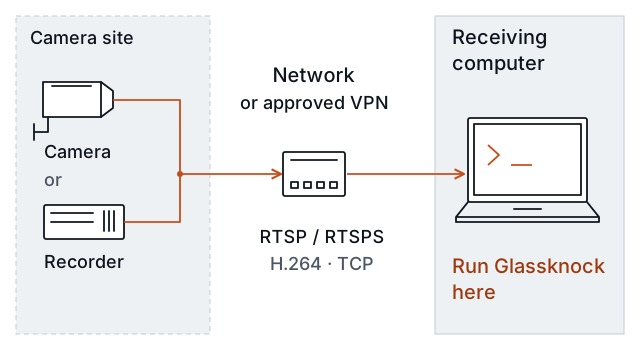
The tool checks one supplied feed. A feed is the video sent by a camera or recorder. The preview supports H.264 video over RTSP or RTSPS, with TCP delivery. H.264 is the video format. RTSP requests a video feed. RTSPS adds encryption. TCP carries the data. Your installer can confirm these settings.
For terms and report details, read Understand the result. For the evidence behind the preview, read Method and validation.