Camera networks
Video must travel from a camera or recorder to the computer that needs it. A working phone app can use a different path.
A recorder collects video from cameras. A video feed is the series of images sent by a camera or recorder. A receiving computer is the computer that needs that feed.
Choose a guide
| Your question | Read this guide |
|---|---|
| Why does the phone app work while monitoring fails? | Phone app vs monitoring |
| Why does the device answer but send no usable video? | The device answers, but there is no video |
| What should I give my installer or IT helper? | Prepare an installer handoff |
The connection to test
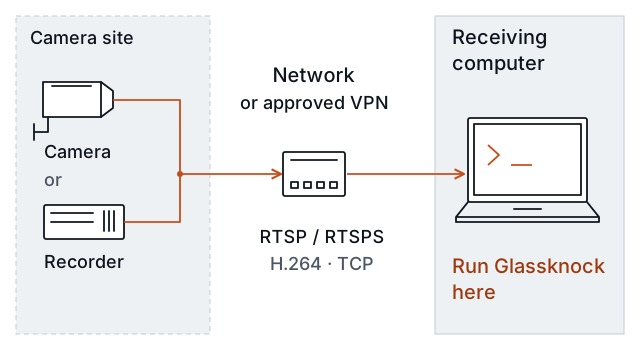
The test must use the receiving computer’s path. A test near the camera does not prove that a remote computer can receive video. A VPN is a connection to another network approved by your IT team.
If you manage the site
Start with the guide for your question. Then use the installer handoff to request a test. Your installer needs an approved viewing account and the exact video address. Keep the password out of messages.
If you install or maintain cameras
H.264 is the supported video format. RTSP requests a video feed. RTSPS adds encryption to that connection. TCP carries the video data.
Read what Glassknock checks. Follow your first check from the computer that needs to receive video.
Glassknock checks one supplied feed. The current preview supports H.264 video over RTSP or RTSPS using TCP. It does not find cameras or change their settings. A short test does not prove daily uptime, recording, or capacity for all site cameras.