Correct a problem and repeat the check
The installer or IT helper makes the approved correction. Glassknock tests the feed; it does not change camera or network settings.
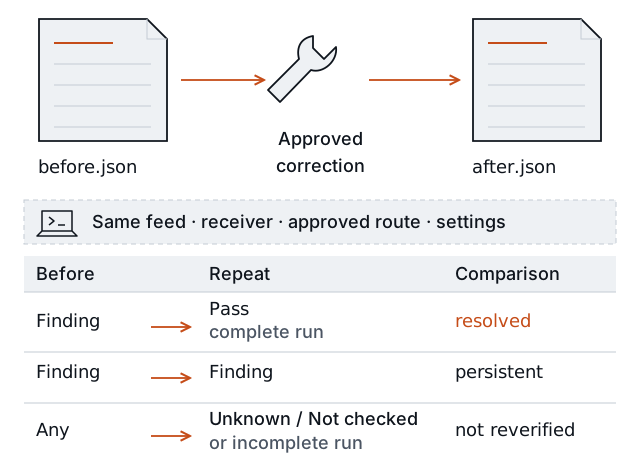
Keep the test comparable
Use the same feed file, receiving computer, intended network connection, and test settings. Record the correction, including any approved network, VPN, or account change. Corrected viewing credentials can differ.
If the video address or test settings change, start a new first test. Those reports describe different tests. Glassknock cannot detect every change to the network route, so the installer must preserve the intended viewpoint.
Save the repeat result
For a feed that needs an account, run these commands separately from the Glassknock project folder:
./glassknock check --config feed.json --credentials --output after.json./glassknock compare before.json after.jsonEnter the approved viewing account locally again. If the feed needs no account, omit --credentials from the check command.
Use a new report filename each time. If the first report is before-2.json, use that filename in the comparison. If the repeat check cannot save a report, correct that error before comparing.
Read each change
| Comparison says | Meaning for this tested condition |
|---|---|
resolved | A prior Finding passed in a compatible, complete repeat test. |
persistent | The repeat test still found the problem. |
new | The repeat test found a problem that was not a prior Finding. |
not reverified | The repeat test cannot establish the result. |
A successful comparison means the reports were compared. It does not mean every check passed. A general changed result does not confirm a repair. Read Understand the result for all comparison rules.
Give the site manager a short explanation: what failed, what was changed, what the repeat test measured, and what still needs work. A resolved condition applies to this feed and computer during this test. Read What it checks for the limits.