Understand the result
Think of video as a delivery. The endpoint must answer. It must allow access. It must send useful video data. The receiving computer must decode the data.
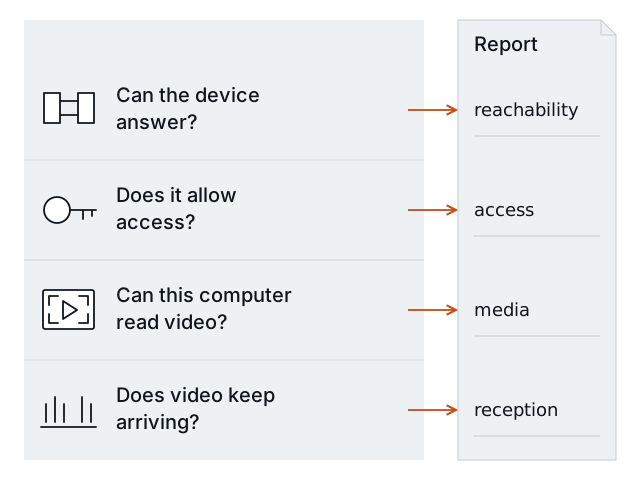
Each question has its own result. One Pass does not pass all four checks.
Each stage provides different evidence. A successful connection does not establish working video.
States
| State | Meaning | Example |
|---|---|---|
| Pass | The tested condition succeeded. | A received H.264 frame was decoded. |
| Finding | The test observed a problem. | The endpoint rejected the supplied viewing account. |
| Unknown | The available evidence is insufficient. | The sample ended before reception could be verified. |
| Not checked | The check was not performed. | Video could not be tested after a connection failure. |
| Not applicable | Reserved for a condition that does not apply to a test. | The four current checks do not emit this state. |
An agent must keep these states when it explains the report. It can suggest a cause or next test, but it must label that suggestion. Missing evidence is not a pass.
Checks
| ID | Evidence | Limits |
|---|---|---|
reachability | Whether this computer opened the supplied TCP connection. | A pass does not identify the service. A failure does not establish power state or the failed network component. |
access | The response to the requested video access. | A protected feed without supplied credentials needs further access information. |
media | Supported media description and actual decoded video frames. | A decoder dependency failure is local to the runner. Unsupported video is outside this method. |
reception | Received media and measured gaps during the bounded sample. | It does not establish long-term uptime or site capacity for concurrent feeds. |
For JSON fields and measured values, read Advanced commands and structured output.
Comparison
Before comparing reports, use the same feed configuration, receiving computer, intended network viewpoint, and sampling settings. Corrected approved credentials can differ; they are intentionally excluded from the fingerprint. Record any network/VPN or account changes with the repair. Glassknock rejects mismatched target fingerprints, runner IDs, or rules versions. The after report must start strictly later than the before report. The tool cannot detect every network or account change.
| Before | After | Interpretation |
|---|---|---|
| Finding | Pass | Resolved in this repeat test. |
| Finding | Finding | Persistent problem. |
| Pass | Finding | New problem. |
| Finding | Unknown or not tested | Not reverified. |
| Any state | Missing or incompatible report | The reports cannot establish a fix. |
The tool also checks basic report evidence. Requested durations must be valid and match. A media or reception pass needs a positive observation duration, received packets, and decoded frames. A completed reception pass must cover the requested duration. A reception pass cannot include media decode errors or local queue drops. An incomplete after run cannot resolve a prior finding, even when one earlier step passed. These checks detect inconsistent data; they do not authenticate a hand-edited report.
“Resolved” refers to the tested condition. It does not certify the camera, the whole site, recording, or security. For example, restoring a feed to this computer does not prove the remote monitoring provider receives it.
Words used in these guides
| Word | Simple meaning |
|---|---|
| Endpoint | The address and video path that the receiver requests. |
| Runner/viewpoint | The computer running the test and its network position. |
| RTSP | A protocol used to request and control a video feed. |
| RTSPS | RTSP carried through an encrypted connection. |
| TCP | The connection used to carry this release’s video data. |
| H.264 | The video coding method supported by this release. |
| Decode | Turn received video data into frames that software can read. |
| Gap | A period without received media data. |