Prepare an installer handoff
Give your helper one clear task: verify the video feed from the computer that needs to receive it.
A useful handoff identifies the feed, the receiving computer, and the approved access. It also asks for evidence after a correction.
A feed is the video sent by a camera. A recorder collects camera video. A VPN is a connection to another network approved by your IT team.
If you manage the site
Use this table to prepare the request. Leave unknown information blank for the installer to confirm.
| Information | What to provide |
|---|---|
| Feed | The camera or recorder channel that monitoring needs. Use a short label that is safe to share. |
| Problem | For example: “The gate camera works in the phone app. Monitoring receives no video.” |
| Receiving computer | Which computer or provider needs the video. |
| Network path | The intended site network or approved VPN, if known. |
| Responsible people | Who can approve the test and who can correct device or network settings. |
| Access | Confirm that an approved viewing account is available. Supply its password through the local input, outside messages. |
Your helper should confirm the exact video address. Keep internal addresses in the local feed configuration. Do not attach that configuration to a routine support request.
Copy this request
Please check the [feed label] video feed with Glassknock. Run the test on [receiving computer] using its intended network connection. Confirm the exact camera or recorder video address and an approved viewing account. Save the first report. Explain each failed or unknown check in simple words. Make only approved corrections. Repeat the same test and save a new report. Tell me what the repeat test proves and what still needs work. Keep passwords and access tokens out of messages, configuration files, and reports.
The current preview uses typed commands and needs an installer or IT helper. It is an early preview. Real-camera and installer trials are still pending.
If you install or maintain cameras
H.264 is the supported video format. RTSP requests a video feed. RTSPS adds encryption to that connection. TCP carries the video data.
Before the test, confirm these items:
| Item | Required check |
|---|---|
| Authorization | You have approval to test the supplied feed. Setting changes need their own authorization. |
| Target | The exact endpoint serves the camera or recorder channel needed by monitoring. |
| Supported method | The feed uses H.264 over RTSP or RTSPS using TCP. |
| Local tools | Glassknock and FFmpeg are ready on the receiving computer. |
| Credentials | The approved viewing account belongs to the device that serves the feed. Enter it locally. |
| Network | The test uses the intended network or approved VPN. |
| Report label | The local target ID does not disclose sensitive site information. |
For RTSPS, confirm the approved certificate trust with IT. For authenticated plain RTSP, obtain approval for unencrypted transport and set that approval in the configuration before the first report. Follow your first check for the setup and commands.
What the monitoring service needs
Before the service can use an existing camera, provide these items through its approved setup process:
| Item | What the installer should confirm |
|---|---|
| Exact feed | The camera or recorder channel and the exact video address. Give the address to the receiving computer through an approved private setup process. |
| Viewing access | An approved viewing account for that device and feed. Supply the password through approved local or private credential input. |
| Video settings | The format and connection method needed by the monitoring software. Glassknock can test H.264 over RTSP or RTSPS using TCP. |
| Network path | How the receiving computer reaches the feed, including any approved VPN and certificate trust. |
| Measured result | A reviewed report from the intended receiving computer, with its test time and sample settings. |
| Remaining checks | Any unresolved result, plus the monitoring service’s own test of video, recording, and alerts as required. |
The service must verify its own software with the supplied feed. A Glassknock pass does not replace that check. Keep private setup details separate from the reviewed diagnostic report.
Save, correct, and repeat
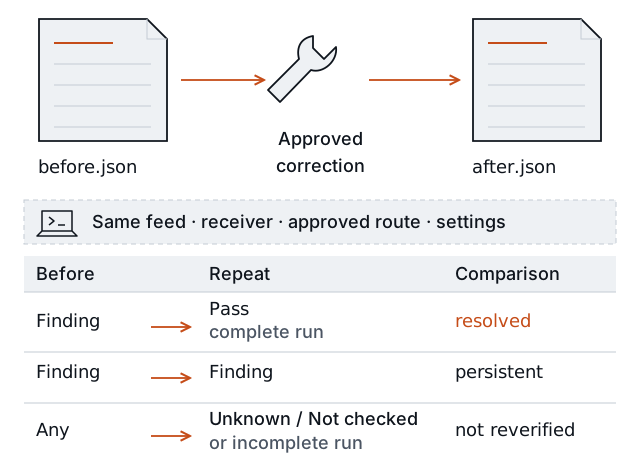
Keep the first report. Repeat the same test after the correction. Finding → Pass can resolve the tested problem. Unknown or an untested check keeps the work open.
- Save the first report with a new filename.
- Identify the observed failure. State whether its cause is confirmed or still unknown.
- Have the responsible person make the approved correction.
- Repeat the same feed configuration, computer, network path, and test settings. Corrected viewing credentials can differ.
- Save a new report and compare it with the first report.
If the correction changes the video address or sample settings, start a new baseline. The old and new reports cannot verify the same connection. See comparison rules.
Return a clear result
Use this table in the handoff back to the site owner:
| Field | What to report |
|---|---|
| Tested feed | The non-secret local target ID. |
| Test location and time | Receiving computer, intended network path, and test time with time zone. |
| First result | Contact, access, readable video, and reception results. |
| Cause | The confirmed cause, or “cause not confirmed.” |
| Correction | The approved change and the person responsible. |
| Repeat result | Each check’s new state and whether the comparison could verify the correction. |
| Remaining work | What is still unknown, failing, or awaiting a responsible person. |
Attach the reviewed reports if needed. Keep passwords, access tokens, private credential files, and feed configuration out of the handoff. The report contains the chosen target ID, so review that label before sharing.
A pass applies to this feed, computer, and sample. It does not establish that a remote provider received the video, that all site feeds work together, or that recording and alerts work. Confirm those tasks with the responsible system owner.