Cannot connect to a camera feed
A failed connection means this computer could not contact the tested endpoint. It does not prove the camera is powered off.
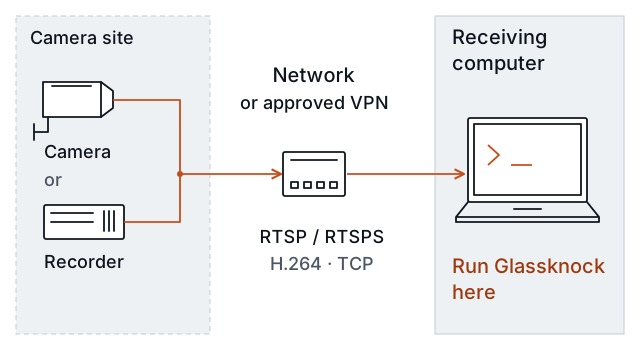
Test the path that the monitoring computer uses.
The fault can be anywhere along this path. Keep a record of the Glassknock result before changing anything.
Check the supplied endpoint
Ask the camera owner or installer to confirm the address, port, and exact video path. Copy the endpoint from the supported equipment’s configuration or official instructions. Do not guess addresses or scan a wider network.
An endpoint for a recorder channel can differ from an endpoint on the camera itself. A phone app may use the manufacturer’s cloud service. Successful phone viewing does not establish that this local RTSP connection is available.
Check the receiving computer’s path
Confirm that the computer is on the expected network or approved VPN. If the endpoint name fails to resolve, ask the responsible IT person to check name resolution. If the connection times out or is refused, check the approved route and service configuration.
The report distinguishes connection_refused, connection_timed_out, and a generic connection_failed. A DNS timeout uses name_lookup_timed_out. A cancelled lookup uses cancelled; it does not establish a DNS fault. not_started means a check did not run, not that a network blocked it.
Do not conclude “firewall fault” from a timeout alone. A wrong address, offline recorder, unavailable service, or blocked path can produce a similar result. Identify which observation supports the next action.
For RTSPS, the computer must trust the endpoint’s certificate. Ask IT for the approved trust setup. Do not silently bypass certificate verification to obtain a pass.
Correct and repeat
The responsible person changes the confirmed cause using the equipment or network’s supported procedure. Repeat the same Glassknock check from the intended receiving computer. Compare the new result with the saved result.
If contact works but access or video fails, use the access guide or the video guide. A restored connection is only the first step.
What to report
State the test computer, local target ID, test time, observed connection result, confirmed correction, and repeat-test result. Leave the cause unknown if it was not confirmed. Share a sanitized report, not passwords or the feed configuration.