The device answers, but there is no video
A device can answer a request without delivering usable video. The answer is one step in the connection.
Think of asking for a parcel. The door opens. The person inside still needs to let you collect it. You must receive the parcel and be able to use what is inside.
A feed is the video sent by a camera. A recorder collects camera video. A VPN is a connection to another network approved by your IT team. TCP carries data over the network.
Four checks ask different questions
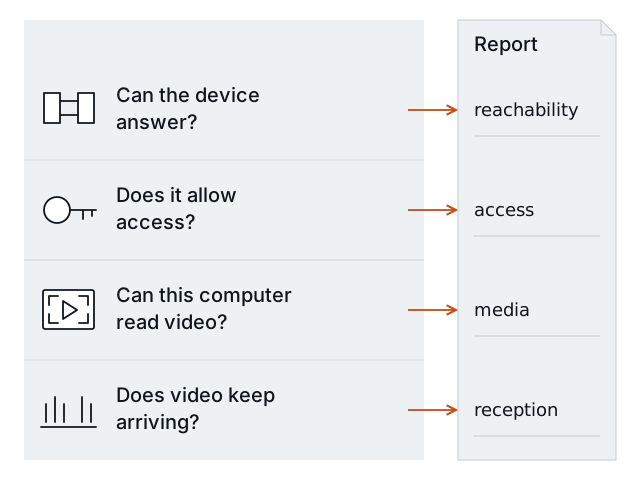
Contact → access → readable video → reception during the sample. Read all four results. One pass does not prove that video works.
| Report check | Simple question | What a pass means |
|---|---|---|
reachability | Can this computer connect to the supplied address and port? | This computer opened the supplied TCP connection. |
access | Does the device allow the video request? | This request was allowed. |
media | Can this computer read the video? | Received data produced decoded video frames. |
reception | Does delivery meet the gap limit? | Delivery met the configured limit during the completed sample. |
A decoded frame is one video image that software can read. Receiving bytes alone does not prove that the computer can read video.
If you manage the site
Ask the installer for the results of all four checks. If they say “the camera answers,” ask them to verify readable video and reception from the monitoring computer too.
You can send this request:
The device answers, but we have not verified video at the monitoring computer. Please check access, readable video, and reception for the exact feed we need. Tell me which check failed, what is confirmed, and what still needs work.
Use Prepare an installer handoff if the helper needs more site information.
If you install or maintain cameras
H.264 is the supported video format. RTSP requests a video feed. RTSPS adds encryption to that connection.
Save the result before you change settings. Use the observed failure to choose the next action.
| Observation | What it establishes | Next action |
|---|---|---|
| The protected feed needs credentials, but none were supplied. | Access information is missing. | Supply the approved viewing account through local credential input. |
| The request is rejected. | This access attempt failed. | Confirm the account, device, permission, and exact video path. Use the access guide. |
| The feed has an unsupported video format. | This preview cannot test that format. | Confirm whether an existing H.264 feed is available. |
| FFmpeg is missing or its decoder fails. | The receiving computer did not complete the video check. | Check the local FFmpeg installation. Use the video guide. |
| No media arrives after access succeeds. | This sample did not receive video data. | Confirm the selected feed and whether the device is sending it. |
| Media arrives but no frame is decoded. | Received data did not establish readable video. | Review the supported format and decoder evidence. |
| Video has gaps beyond the configured limit. | Delivery failed the limit during this sample. | Review the network path and device load with the responsible person. |
The preview tests H.264 over RTSP or RTSPS using TCP. A recorder’s output is a separate target from its underlying camera. Test the feed required by monitoring.
Do not conclude that a camera is powered off because no frame decoded. Do not conclude that a still scene is a frozen feed. A gap alone does not identify a bandwidth problem. Keep the cause unknown until you have evidence.
Correct, then repeat
Have the responsible person make the approved correction. Repeat your first check with the same feed configuration, receiving computer, network path, and sample settings. Corrected viewing credentials can differ.
Compare the saved reports. A prior Finding that becomes Pass in a valid repeat test is resolved for that check. Unknown or Not checked cannot confirm a correction.
See Understand the result for the state meanings and comparison rules. A short passing test does not prove recording, image quality, alert delivery, or daily uptime.